
Well, I guess after 15 years of having a Facebook account, it was bound to eventually happen. If you follow either my personal or business page on Facebook, you may be wondering why you haven’t seen a status update. Well, I am in Facebook Jail!
I would love to tell you it was due to me voicing my opinion about my beliefs or something so incredibly amazing. I wish I could tell you it was because I was trying to “stick it to the man”. But no, after 15 years of being a model citizen on Fakebook, I simply posted an item for sale on Marketplace as I have done for almost 4 years.
This is long, but I want to tell the complete story in hopes of saving you from a headache, especially if you use your personal profile (or professional profile like I have) to manage your business pages. If this was just my personal account, I wouldn’t care. But this account is tied to my business pages which means they will get deleted (and are restricted) because of this.
The Infamous Post that put me in Facebook Jail
The item in question was a used ski machine. I posted pictures of the actual item in my home along with a description. I mean, after all, I am trying to sell everything I can in preparation for my upcoming Nomad life. Here is the marketplace listing in question:
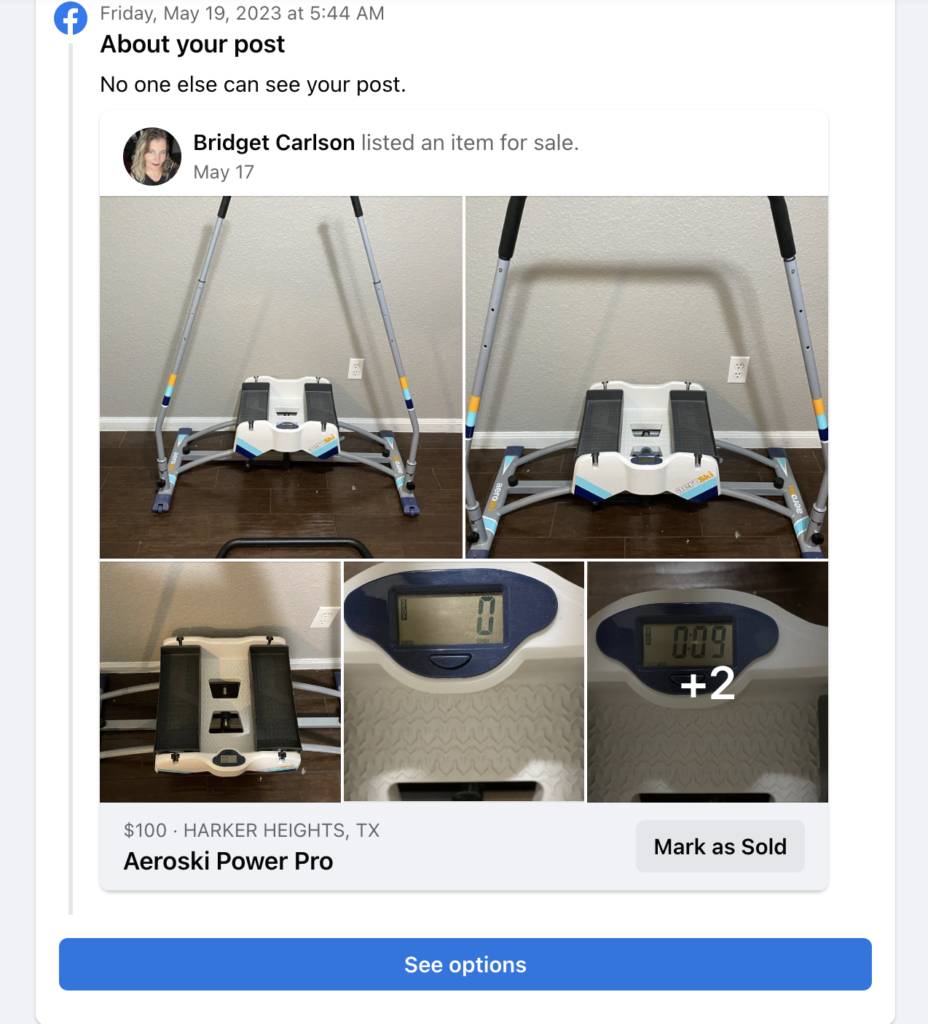
I Wasn’t Notified
Now, I never got a notification that this listing had an issue, no email either. I had no idea that I was in the beginning stages of being put in Facebook Jail. One day, I logged in and it had disappeared so I assumed it was a Facebook glitch or that I had a brain fart and actually never posted it to begin with, so I relisted it at the beginning of June and It ended up selling.
Around the middle of June, I realized that I could not post videos or photos to any of my business pages. I assumed it was a glitch (everything was posting fine on my personal profile), but after three days I decided to head to Google and investigate it further by doing a search for “can’t upload video or photo to facebook business page”.
When I Realized What the Issue Was
After some digging and ruling out issues, I came upon an article that stated I probably had an account restriction in place, meaning I had been placed in Facebook Jail.
An account restriction?!? What on earth for?
The article continued by saying I should check my support inbox to see if there are any notifications.
My support inbox? Where in the hell is that?
For future reference, you get to your support inbox by clicking your profile picture in the corner, then Help & Support, then Support Inbox. Once there click Your Alerts.
Here was my notice:

Yes, the marketplace listing had been reported for Trademark Infringement (because I used the brand name of the item in the Title and Description of the listing)! As you can see, it was reported multiple times on that one day by the company that owns the Trademark for Aeroski (apparently they don’t want you to sell it when you no longer want/need it).
Contacting Facebook
I figured this must be a mistake as it made no sense, so after about an hour of digging I was able to find the information on how to contact Fakebook about trademark infringement issues.
The first response:
Hi,
Thanks for contacting us. In order to process your appeal, we need more information from you. Please provide us with:
-The original report number of the complaint at issue
– Identification of the content that has been removed or to which access has been disabled
-An explanation of why you believe the content should be restored
Once we’ve received this additional information, we’ll continue to look into the matter.
Thanks,
Facebook
My Response:
I was never given a report number. I was never notified that an issue even happened. I found out by chance after not being able to post photos or videos to any of my pages and went to my support inbox on my personal account and found it. I have attached the screenshots showing what that is.
It was a marketplace listing for an Aeroski Machine. I am moving and am selling used items I don’t want to move (which is what I thought Marketplace was for). It was apparently removed for Trademark Infringement and my account has now been restricted because of it.
Again, I was given no notification that this even happened. I simply found out by accident when I went to my support inbox to try and find a way to contact Facebook about not being able to post images and videos. Again there is no report number, and no way to link to the issue because Facebook doesn’t provide a way to do so. The only thing I have is the screenshots from my Support Inbox which I have attached.
It says I am not allowed to manage profiles for 27 days because of this issue. I am trying to understand what the issue even was so I know not to do it again. I was just simply listing a used item for sale on Marketplace. I don’t need that restored as it did sell but would like my account taken off of restriction status and know exactly how it is considered Trademark Infringement.
Bridget Carlson
Their Follow-Up Response:
Hi,
Thanks for contacting us. We removed your content on Facebook because we received a report that it infringed someone else’s intellectual property rights.
When we receive a proper claim of intellectual property rights infringement, we promptly remove or disable access to the allegedly infringing content. If you think that this content shouldn’t have been removed from Facebook, you can contact the reporting party directly to resolve your issue:
Report #: <REDACTED>
Rights Owner: <REDACTED>
Email: <REDACTED>
If an agreement is reached to restore the reported content, please have the reporting party send us a retraction through the appropriate channel. Please keep in mind that the reporting party is not required to respond to you.
If you think that this report was inaccurate or was not made in good faith, you may wish to contact a lawyer. You may also want to have your legal counsel contact the complaining party on your behalf.
Please make sure that you only post content that you have the rights to share. People who post content that infringes someone else’s intellectual property rights can be temporarily blocked from posting on Facebook or even have their account permanently disabled.
To learn more about copyrights, trademarks and our intellectual property policies, please visit the Help Center at the links below.
Copyright: <link removed>
Trademark: <link removed>
Thanks,
Chihiro
Facebook
It Gets Worse
After the follow-up email from Fakebook, I decided to just drop it, wait my now 20-something days, and just make sure to not use Marketplace anymore or mention brand names anywhere on Facebook (they created a tool for brands that scan posts and pictures which then notify brands that their trademark was used, so they can report the post or picture if they wish).
I was still able to post status messages, reply to messages on messenger, manage my Facebook groups, and even create Fakebook Marketplace listings so, whatever!
Fast forward to three days later…..
I tried to comment on a post and a notification appeared that stated I could not post to Facebook from this account. For security reasons, my account has limited access to the site for a few days.
The next day as I was going to reply to a message on messenger a notice informed me that I can’t send messages for 7 days because something I sent in chat went against their community standards (I don’t use messenger except to reply to Marketplace messages). An hour later I went back into messenger to see if it was a glitch and the time period went from 7 days to 1000+ days.
No, I Wasn’t Hacked
I know you are probably thinking, you must have been hacked and someone was sending messages out. But, that is not the case. My account is secure (I made sure of that because it is tied to my business pages). I have 2-factor authentication set up and there were no unusual logins in the logs or IP addresses that I did not recognize.
Waiting it Out
So now, I can no longer manage any of my groups, post status updates, videos or pictures, nor can I manage any of my business pages. I can’t even add another admin to the pages (this would allow the page to continue should my personal/professional account be deleted).
The only thing I can do now is wait another 16 days and see if everything goes back to normal. If it doesn’t and it ends up getting deleted, I have made the decision to not go back to Fakebook. To me, it is just crazy that someone who has had an account for 15 years and has never been in “trouble” gets this kind of aggressive punishment, for simply trying to sell a used piece of exercise equipment.
In the Meantime
In the meantime, I will be posting updates on Twitter, TikTok, Instagram (oddly enough I was not limited there), and YouTube.
Lesson Learned
The biggest lesson I learned here is to make sure to have more than one person that has full access to your business pages and groups in the event that something happens with your personal profile that is connected to it, that way you can regain access with a new profile.
Also, don’t rely so heavily on social media to connect with your followers. If those pages are lost, you lose them. Make sure you have a mailing list they can sign up for (I do), or some other way to keep connected to them. I currently have over 20,000 followers between my Fakebook pages, yet only 1400 email subscribers, so if those pages are gone, I lose just about everyone and have no way to get word to them about what happened.
You can sign up here if you haven’t already, and would like to keep updated. I send out a monthly newsletter and a weekly roundup of posts from the blog every Monday from the following week:
Get New Posts Via Email
Like my website? Then you’ll love my monthly newsletter!! Be the first to know of giveaways and get a weekly digest posted every Monday of new posts.
UPDATE!!!!!
Update as of July 14, 2023,
I was supposed to be paroled yesterday and while the notice that I can’t manage my profiles is gone, I still cannot do anything. It now says “For security reasons, your account has limited access to the site for a few days”. My messenger still says that I cannot send messages for 1000+ days.
With this, I am done with Facebook. I am beyond livid at their random enforcement of “policies”, the fact that they shut my account down over a damn marketplace listing for a used piece of gym equipment simply because I mentioned the brand name which is considered fair use policy when using Trademarked names. The fact that I can’t get ahold of anyone unless I want to become Meta verified and start paying $14.99 a month. I spent 15 years and a lot of money on Facebook ads to grow my following and business pages. I have never been in trouble with them. This is absurd!
I have removed the app from all my devices and the account will just sit there I guess. Who knows if they will ever allow me to do anything with it again.
So, I will now spend my time and energy on other platforms I have neglected. Please follow me on YouTube, TikTok, and dare I say Instagram (yes that account is still active). I also have a Nutty Hiker Adventures Chat Telegram group, Hiker Chat Telegram Group, and Nutty Hiker channel (I don’t really know how to use it, but am trying to learn) lol. Of course, I also have Twitter.
So who else has landed in Facebook Jail? LOL, comment below and let me know your story!
Popular posts:









I would contact the company that states you infringed copyright…..Tell them you were merely selling used item you had originally bought from them as you were moving! Ask them to retract! If you just wait it out, you still will have that mark against you on facebook, as I have one against me that will never go away. If I make another ‘mistake’ on there that sticks, my time frame for not being able to post will be like triple what it was the first time. Its crazy. But, still, because you have business pages and because facebook is nice to have to keep in touch with friends/family from afar, i would just try to get the actual company to retract. Thats crazy that some bozo from the company reported it, to begin with. What a way for the company to lost business with such nonsense! I think i’m still moderator on USMC hangout page, although i haven’t been able to get on there much lately to moderate due to my other half being extremely sick, so i can go in there and keep a better eye on that if you need me to. Good luck!
Hey Kristin! Thank you!
I did send them an email but doubt I will ever hear back from them, especially since they reported the post over and over and over again on the same day. The company is out of Mexico, so I am not dealing with a U.S. company which makes it even more difficult.
That is so frustrating! It is so annoying to have to deal with this, when you didn’t do anything wrong. I am sorry that you had to go through all of this.
Thank you! It is so very frustrating for sure! I decided after this to basically not use my account to do anything on FB so it doesn’t happen again.
I am so sorry you’re dealing with this! It is very frustrating and unfair but as you said, the best way forward is to wait it out…
That is pretty much all I can do. They refuse to budge on their stance and refuse to answer anymore questions unless I pay their monthly verification fee to get support. I have about a week left now.
This seems so crazy! I have never been put into Facebook Jail – but I have had a few friends that have for really stupid things.
Tell me about it! What is the point of Marketplace if you can’t list your used items for sale and mention the brand and details about it in the listing? Just so stupid!
Im sorry you had to experience such thing. I will keep in mind to more people to access my group such as an virtual assistant!
Im so sad this happens to someone! The aiting out and the process is just frustrating.
FB doesn’t make any sense to me when it comes to the censorship. I don’t know how some things get flagged and other things are just left there. It’s a headache to deal with and an exhausting experience…so sorry you had to deal with this. I think the worst part is that they don’t notify you.
Sorry to hear about your experience. These are good points to take note of incase this happens to anyone. Thanks!
Hey there,
I read your experience with Facebook Jail, and I have to say it sounds frustrating. It’s unfortunate that a simple marketplace listing led to such restrictions on your account, especially considering your long history on the platform. Having multiple admins for business pages is a great idea, and it’s essential to have alternative ways to connect with your followers. Hang in there, and I hope everything gets back to normal soon.
Facebook jail has never happened to me but some friends have for really stupid reasons. Thanks for sharing this.
How frustrating!. I think sometimes you can’t win with Facebook and they literally pull people out the hay to block for ‘a reason’ , so stupid!
I’m dealing with this right now too and just went scouring the Internet for something similar because I’m baffled! Mine is due to selling a slim cycle bike… no warning given, they also marked a post of my sister as spam because she was sliding across the floor and I joked “got a dirty floor? My sister will clean it for you” this was a 10 year old post and they just removed it before I could save it. Sooooooo unbelievable!
That is just nuts! I still cannot do anything with that account. I even became Meta Verified, so I could contact support. All they can tell me is that they are “looking into it”. There has been no resolution. My account status says there are no restrictions. And my support inbox that originally had the “violation” is empty. The “violation” was removed. Yet, here I am still not able to do anything with the account and still blocked from using messenger for 1000+ day